Why Are Your Emails Going to Spam? 5 Hidden Traps Every Event Organizer Must Avoid
Imagine the scenario: preparations for your conference, seminar, or course are reaching their peak. You prepare the message with instructions, hit "Send," and wait for everything to run smoothly. Instead, your phone starts ringing: "Where is my ticket?", "I didn't receive anything!" Meanwhile, your system reports a 99% delivery rate. What went wrong?
if you find this text too technical, skip ahead here.
The answer lies in a discipline called email deliverability. In this guide, we'll explain without unnecessary jargon why your messages land in the spam folder and the five major mistakes that cost you your attendees' attention and trust.
1. The Difference Between Sending and Delivery: The Illusion of Green Numbers
Many event organizers confuse sending (delivery) with actually reaching the inbox (deliverability). A delivery rate of 98% only means that the recipient's mail server (e.g., Gmail or Outlook) accepted the message at its gateway. Whether it makes it all the way to the inbox depends on advanced security algorithms.
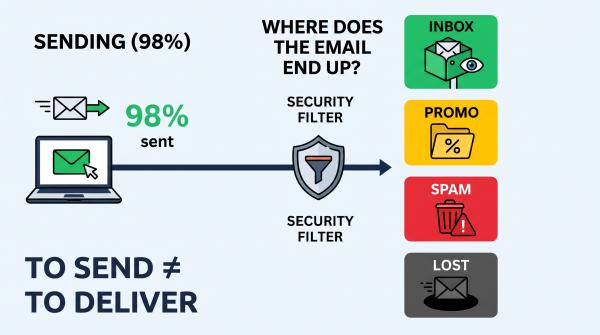
The server evaluates dozens of parameters to decide where the message goes:
- Primary Inbox: The ideal scenario, your email is front and center.
- Promotions / Updates tab: A better outcome, but open rates drop significantly.
- Spam / Junk folder: The message is practically invisible.
- Silent Drop (Blackhole): The message vanishes without a trace.
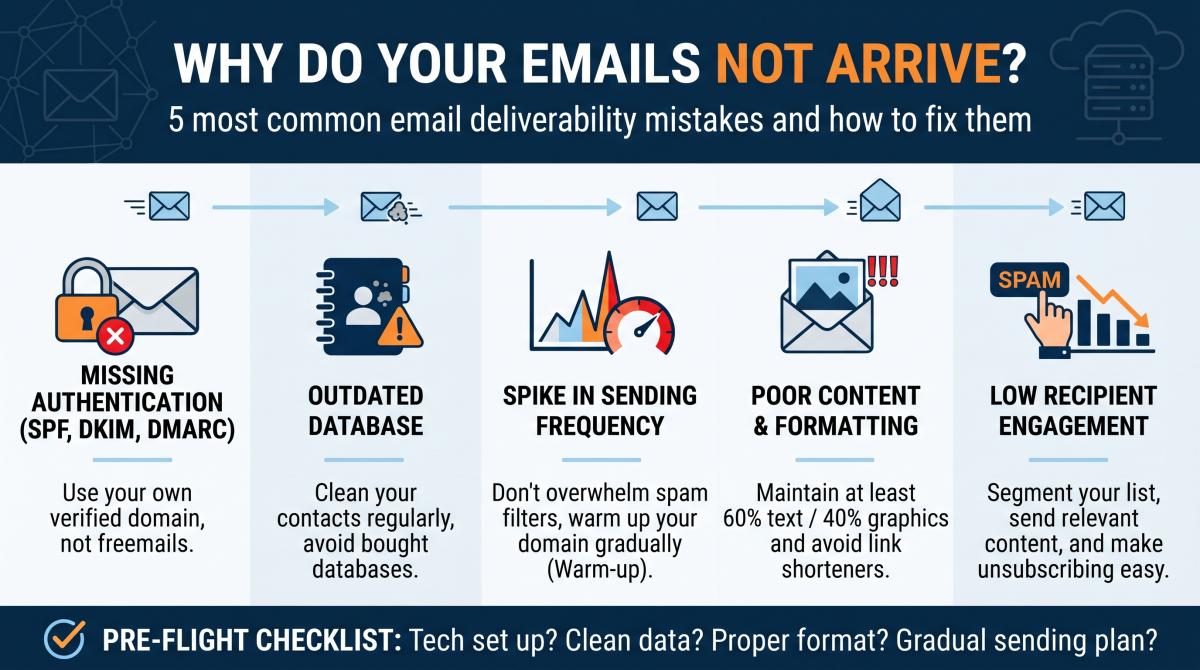
Reason 1: Missing Technical Sender Authentication (SPF, DKIM, and DMARC)
If you haven't set up authentication mechanisms, mailbox providers automatically consider you a potential fraudster. This trio plays a crucial role:
SPF
A public DNS record that lists the servers authorized to send mail on behalf of your domain.
DKIM
A cryptographic signature confirming the sender's authenticity and ensuring the content wasn't altered in transit.
DMARC
A policy telling servers how to handle messages that fail SPF or DKIM checks (quarantine or reject).
Beware of sending from freemails!
Sending campaigns from addresses like event@gmail.com via bulk tools is doomed to fail. Without your own verified domain (e.g., @yourevent.com), you won't make it to the inbox.
Reason 2: Outdated Contacts and Purchased Databases
In the B2B sector, 20% to 30% of contacts degrade every year (job changes, closed accounts). If you blast an email after a year of silence to an old list, you risk:
- Hard Bounces: Undeliverable addresses. Once they exceed 2%, your domain reputation drops sharply.
- Spam Traps: Fictional addresses planted by anti-spam authorities. Hitting a pristine trap means an instant blacklist.
Purchasing databases is a fast track to the spam folder, a violation of GDPR and anti-spam laws, and can permanently ruin your domain's reputation.
Reason 3: Poor Frequency Management and Lack of Warm-Up
Six months of silence followed by a sudden blast of 30,000 emails in five minutes? To filters from Google or Microsoft, this looks like a compromised server spewing phishing attacks.
How to properly warm up your domain (Warm-up)?
- Start with your most engaged contacts: Send the first wave to your most active attendees and VIP guests.
- Scale your volume: Spread the sending over several days, gradually increasing the numbers.
- Maintain consistency: Communicate continuously throughout the year (e.g., monthly roundups) rather than just sporadically.
Reason 4: Format and Content Filter Triggers
Modern filters evaluate the entire context of a message. Common violations include:
| Risky Practice | Safe Solution |
|---|---|
| An email made of a single large image | At least 60% live HTML text to 40% graphics ratio |
| URL shorteners (bit.ly, TinyURL) | Direct, secure HTTPS links pointing to your own domain |
| Hidden or tiny unsubscribe links | A clear, 1-2 click unsubscribe link |
| CAPSLOCK and excessive exclamation marks in subject lines | Factual, appealing, and professional subject lines without clickbait |
Reason 5: Low Engagement and Spam Complaints
Algorithms track user behavior. While opens, clicks, and replies boost your reputation, deleting an email unread or manually marking it as spam destroys it. Gmail penalizes domains once they cross the 0.3% spam complaint rate threshold (3 reports per 1,000 messages).
The solution is segmentation: Send relevant content based on ticket types, attendance history, and activity. It's better to remove contacts who haven't engaged in a long time from your active database.
Pre-Campaign Checklist
- ✔ Technical: Valid SPF, active DKIM, configured DMARC, custom sending domain.
- ✔ Database: Cleaned inactive addresses, no purchased lists, hard bounces removed.
- ✔ Content: Sufficient text (60/40), direct HTTPS links without shorteners, visible unsubscribe button.
- ✔ Plan: Gradual send ramp-up and interest-based segmentation.
Conclusion: Email as the Backbone of a Successful Event
Whether your emails land in the inbox or the spam folder is not a matter of luck. It is the direct result of technical setup, database hygiene, and respect for your recipients. Take care of deliverability in time—this ensures important instructions and tickets reach exactly where your attendees need them. Front and center.